

I started Ogon because getting models ready for a game takes too long. Every model needs LODs, collision, a sensible pivot, textures packed the way the engine wants them, and usually a few holes fixed. The free tools that do this are good, but they fall over on exactly the kind of models I use: modular kits, palette-textured props and AI-generated meshes.
So I wrote my own. Ogon is a desktop app for Windows and Linux, about 184,000 lines of C++23 with 1,082 tests. It has 55 tools and 18 recipes, which are ready-made chains of tools for common jobs.
This page explains how it's put together and how each of the main methods works. For each one I've included what I measured against the tool most people would use instead, and where mine still loses. All the numbers come from measurement notes I keep in the repo.
How it's put together
| Part | What I used |
|---|---|
| Language | C++23, built with clang on Linux and clang-cl on Windows |
| Graphics | Vulkan 1.3 with dynamic rendering, synchronization2, timeline semaphores and descriptor indexing |
| Shaders | Slang, compiled to SPIR-V at build time and shipped in one compressed pack |
| Window and UI | SDL3, and RmlUi drawn by my own Vulkan renderer |
| Build | CMake with CPM. Every dependency is pinned in one file, which doubles as the licence list |
| Testing | GoogleTest, AddressSanitizer, UBSan, ThreadSanitizer and libFuzzer |
The core has no UI. Everything that does real work lives in small libraries that run headless, so the app, the command line and my CI all use the same code. CMake's link rules stop a lower library from reaching up into a higher one. The libraries are foundation for errors, logging, memory and jobs, then asset, io (glTF, OBJ, FBX, PLY, STL, PNG and EXR), geometry, gpu, command, pipeline, link, nn and tools. There are no singletons or mutable globals. Errors travel as std::expected, and my own code never throws.
Each tool describes itself, and the app builds the rest. A tool is a plugin that registers commands. Each command publishes a JSON schema that lists its inputs (a texture, a mesh, a scene, a folder), its settings (a number with a range and unit, a choice, a colour, a file path, an engine profile) and a few flags such as "needs a GPU". From that one schema Ogon builds the settings panel, the node in the pipeline editor, the command-line flags and the menus in the engine plugin. There's no code generator involved. A command itself is a pure function that takes a context, its inputs and its settings, and returns outputs. Plugins talk to the app through a C interface with size-prefixed function tables, so an old plugin keeps working when the app grows.
Jobs run on my own scheduler. It has three priority levels. Inside an algorithm, parallel_for splits work across the same thread pool, and a thread that's waiting picks up chunks instead of sleeping. Each job says how much RAM and VRAM it needs and only starts when there's room. The VRAM figure comes from VK_EXT_memory_budget.
Pipelines are graphs saved as JSON. A .ogonpipe file is a versioned graph of commands with typed connections, and it's checked before anything runs. Branches that don't depend on each other run in parallel. If the input is a folder, the whole graph runs once per file, and in watch mode it only reruns the files that changed.
Results are cached by content. The cache key is an XXH3-128 hash of the command, its version, the plugin build, the settings and the input files. Writes are atomic renames, so a crash never leaves half a file. Running a pipeline a second time only redoes the steps whose inputs changed.
The GPU layer. I use volk and VMA. GPU objects are freed only once a timeline semaphore shows the GPU has finished with them. Descriptors are bindless. When code asks for a compute dispatch, it says what it reads and writes, and the layer inserts the barriers. Ogon picks a GPU by its type and features, never by its index, because on my laptop the Intel chip shows up first. Every Vulkan path runs clean under the validation layers, including synchronization validation. Saving the pipeline cache cut pipeline creation on my RTX 3060 laptop from 18.1 ms to 0.068 ms.
The interface. RmlUi documents are bound to view models, the tool panels come from the schemas, and themes are JSON files of colour tokens. An automated sweep checks the layout at several UI scales. The 3D view is forward PBR with 4x MSAA, wireframe drawn from barycentric coordinates, and a GPU heatmap for comparing two meshes. It only redraws when something changes, so an idle window costs nothing.
The engine link. A small TCP server listens on 127.0.0.1 only. It writes a random session token into a link.json file that only the owner can read. Each message is a 4-byte length followed by JSON, and messages carry file paths and hashes rather than the data itself. The Godot plugin builds its menus from the same schemas the app uses.
Testing. Every GPU algorithm has a CPU version that the tests compare it against. The importers and parsers are fuzzed. For each of the main methods I also wrote a separate judge that shares no code with the method, some of them as Blender scripts, so a method never gets to mark its own work.
LODs
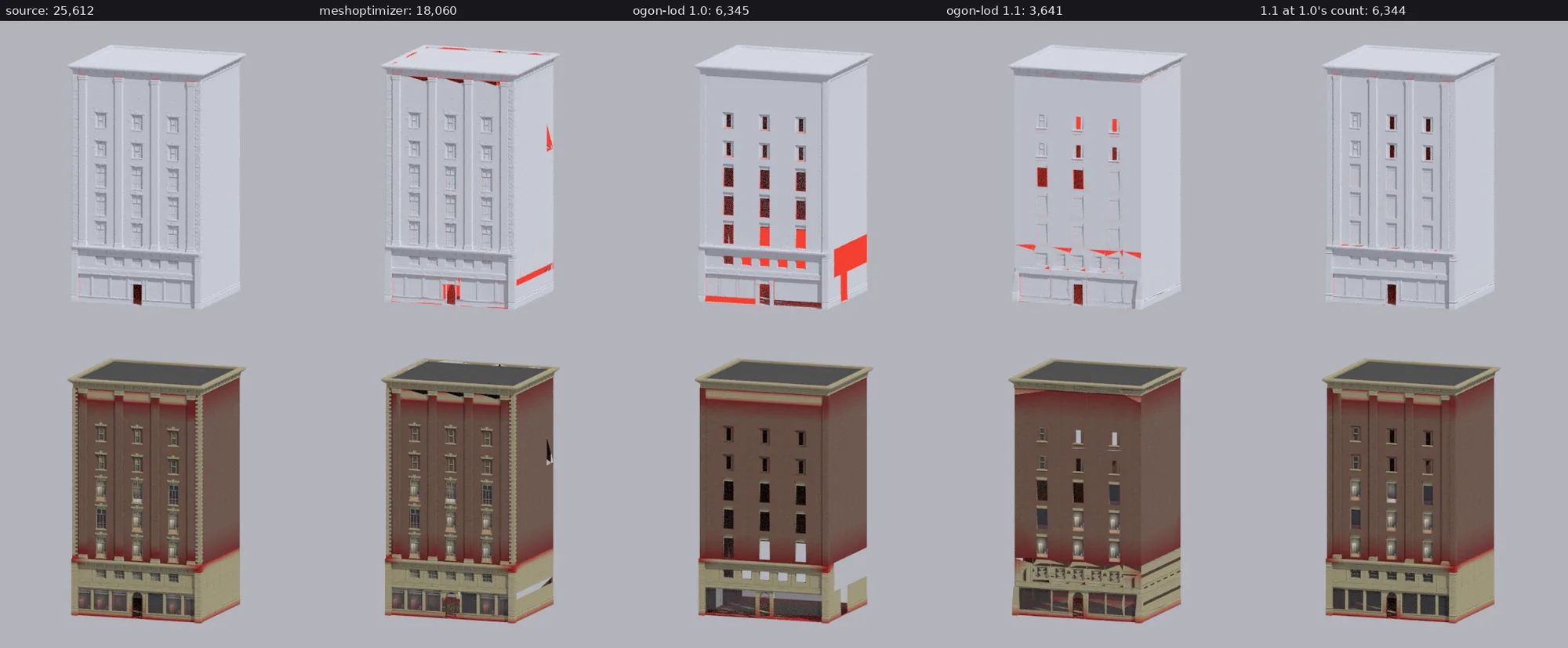
The usual tool here is meshoptimizer's simplifier, and on most models it's excellent. It struggles with seams. A seam is a spot where two vertices sit in the same place but carry different normals, UVs or colours. A simplifier has to keep seams or the model cracks open, so it locks them in place. Flat-shaded kit buildings and palette-textured vehicles have seams almost everywhere, so there's very little left for the simplifier to remove.
ogon-lod 1.0 is my own simplifier, built to cope with seams.
- It uses Hoppe's idea of points and wedges from 1999. The shape error belongs to the position, and the attributes belong to each vertex at that position. That way a seam can move as one piece. It neither tears open nor freezes.
- When two vertices merge, the survivor moves to wherever the plane error is lowest. Attribute errors are weighted by how much surface they cover.
- A small amount of line error (from a 2025 SGP paper, at a weight of 0.001) keeps the maths stable on flat areas.
- If deleting a whole small part costs less than the next merge, it deletes the part. The cost is its area times how far it stands off the surface, squared.
| 20% of triangles kept | Method | Triangles | Worst error | Average error |
|---|---|---|---|---|
| Hydrant | meshoptimizer | 208 | 2.54% | 0.455% |
| Hydrant | ogon-lod 1.0 | 208 | 1.80% | 0.136% |
| Townhouse | meshoptimizer | 1,788 (stuck) | 6.86% | 0.061% |
| Townhouse | ogon-lod 1.0 | 322 | 2.68% | 0.028% |
ogon-lod 1.1 looks at the model before it changes anything. Version 1.0 could reach the triangle count, but on detailed buildings it did it by crushing the windows. Asked for 2,293 triangles on one kit building, meshoptimizer gave 10,894 and 1.0 gave 4,458. So 1.1 adds a few rules:
- It looks at the model from 64 directions. Any part where less than 0.5% of the area can be seen goes first, as a whole piece. On one building, 3,753 of its 18,152 triangles can't be seen from anywhere.
- Where neighbouring normals differ by more than 30 degrees, it treats that as a hard edge and keeps it straight.
- An open border may move by an eighth of the allowed error in total. A border that's pressed against another border may move a tenth of that.
- No triangle may turn more than 60 degrees away from the way it faced at the start.
- A small part lying on a bigger one is removed whole. The exception is when lines of sight through it hit a face from behind. That means it's a lid covering an opening, so it stays.
- It stops when the next step would cost more than a limit, before the shape breaks. The limit is a quarter of the max error squared, times the area each target triangle would cover.
I had a separate judge compare 1.1 with 1.0 at 1.0's own triangle counts on 28 models. It was better on 10, the same on 7 and worse on 2, and on 9 it no longer reached the count. On the Building_Medium_2 model at 6,345 triangles, the picture difference dropped from 1.88 to 0.38.
LODs for animated characters. A LOD made from the bind pose breaks at the elbow, because a straight arm looks like an easy place to simplify. So Ogon bends the mesh into up to 32 frames from its animation clips, 16 random joint bends and every blend shape. From each pose it removes the best-fitting affine transform, then keeps the 8 main patterns of movement that are left. The error measured on those 8 patterns adds up to the same as the error over every pose. That means 24 numbers per vertex can stand in for all the poses as extra attributes. Skin weights travel with the vertices, so every LOD stays skinned.
| Kenney survivor, poses it hadn't seen | Worst error in motion, without | Worst error in motion, with |
|---|---|---|
| 50% of triangles kept | 3.71% | 1.15% |
| 25% of triangles kept | 5.26% | 2.40% |
Where it falls short. Version 1.0 is 5 to 15 times slower than meshoptimizer, and 1.1 is another 3 to 4 times slower again. 1.1 isn't the default yet. It loses on Building_Small_1, and I tuned its constants on the same 28 models I judged it on. The pose-aware mode fixes the worst case, but it only moves the average by up to 20%, and I've only tested it on one real rig.
Collision
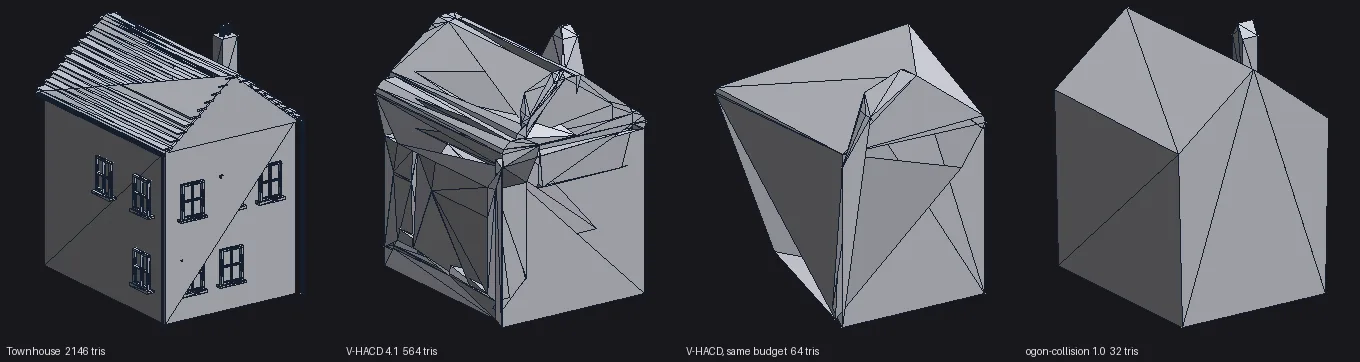
The usual tool is V-HACD. It fills a model with voxels and wraps groups of them in convex hulls. On a 1,040-triangle hydrant that gives 988 triangles of collision. If you limit the number of vertices to save physics time, the hulls shrink inside the surface and the mesh starts poking out. V-HACD also tries to keep the total volume small, and a hull stretched across a doorway adds very little volume. So it happily blocks the door.
ogon-collision 1.0 measures one thing instead: the stand-off, meaning how far the outside of a shape sits from the real surface.
- It splits the model into its loose parts. A part that sits inside a bigger part's hull joins that part.
- While any hull stands off by more than 60% of the tolerance, it cuts the hull in two. The cutting planes come from faces at concave edges, from large flat faces, and from 7 evenly spaced planes along each axis.
- It clips the surface rather than a solid, so open meshes work too.
- It simplifies each hull by removing face planes, cheapest first. Removing a plane only makes a hull bigger, so the mesh always stays inside.
- When a box (12 triangles), a prism, a sphere or a capsule fits just as closely, it uses that instead.
| Model | Method | Triangles | Mesh poking out | Stand-off | Time |
|---|---|---|---|---|---|
| Hydrant | V-HACD | 988 | 0.78% | 3.72% | 1,750 ms |
| Hydrant | Ogon | 240 | 0.00% | 2.47% | 261 ms |
| Townhouse | V-HACD at the same budget | 64 | 13.94% | 7.54% | 3,654 ms |
| Townhouse | Ogon | 32 | 0.00% | 2.95% | 47 ms |
| Boulder | V-HACD | 1,366 | 2.35% | 1.84% | 3,433 ms |
| Boulder | Ogon | 128 | 0.00% | 5.28% | 978 ms |
Across 13 models, the total went from 12,982 triangles to 1,570, and the time from 80 seconds to 3.3. The kit doorway gets 3 boxes and you can still walk through it.
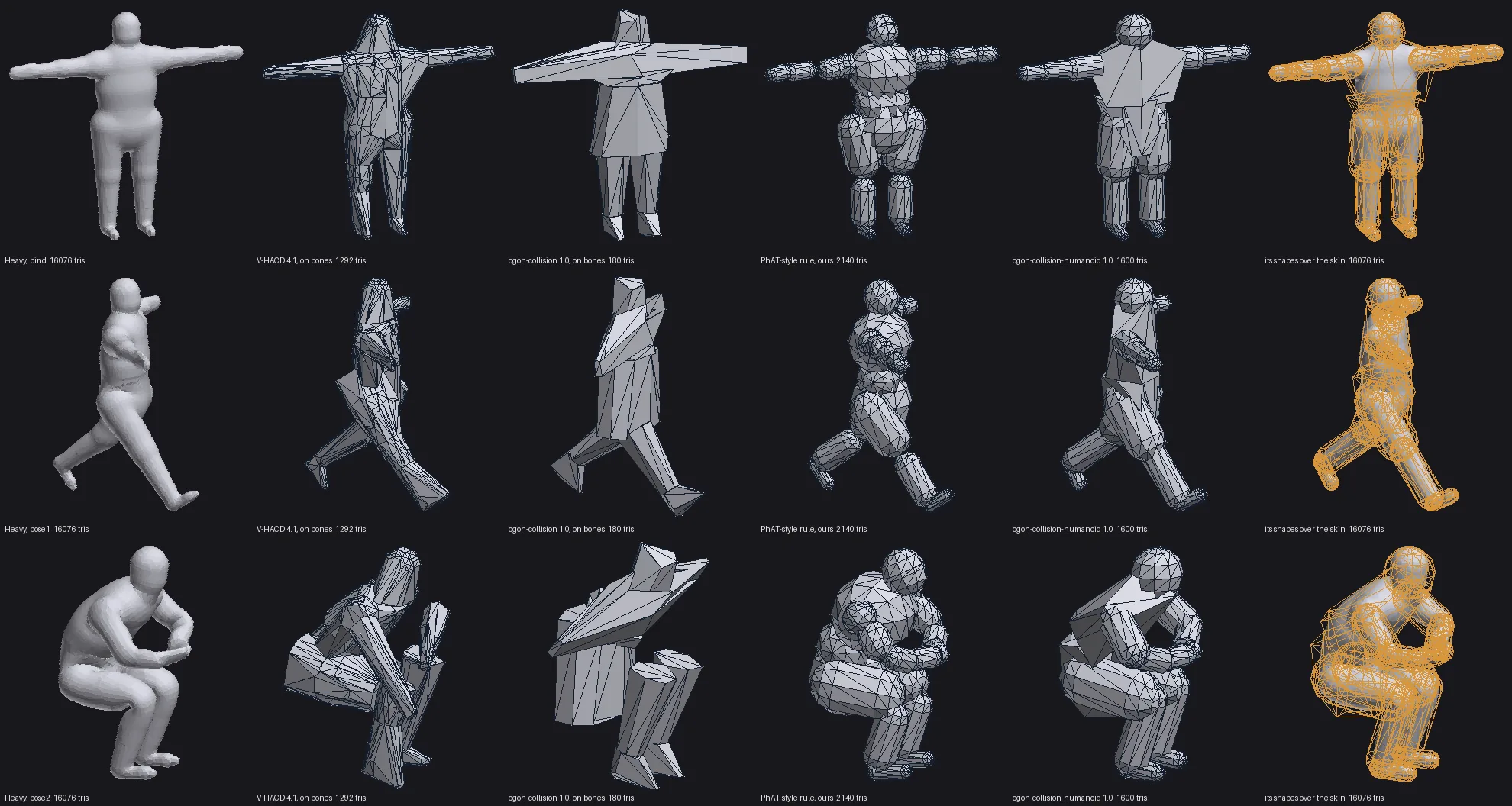
Characters. Hulls made in the bind pose don't follow the character once it moves. On my walking test character, 21.8% of the skin ended up outside every shape mid-stride. ogon-collision-humanoid only reads the bind pose and the skin weights:
- Each point on the skin goes to the bone it would move least against if every joint turned.
- Small bones merge into their parent when that's cheap. The decision is made by size, never by bone name.
- Each bone tries a hull, a box, a sphere and capsules. Every candidate is measured again with each joint bent six different ways, and the best one wins.
- The left and right sides are mirrored.
During its walk, the test character ends up with a 4.27% stand-off, 0.6% of its skin uncovered, and 16 shapes. Compared with the common rule of one capsule per bone, it leaves less skin uncovered on 26 of 27 characters.
Where it falls short. Round rocks cost more. The boulder's stand-off is 5.28% against V-HACD's 1.84%, although V-HACD spends ten times the triangles. On one real mannequin at 16 shapes, a capsule per bone does better in motion (3.25% against 4.52%). Skirts come out badly with every method. And I haven't yet checked the shapes after importing them into an engine.
Occluders and shadow proxies
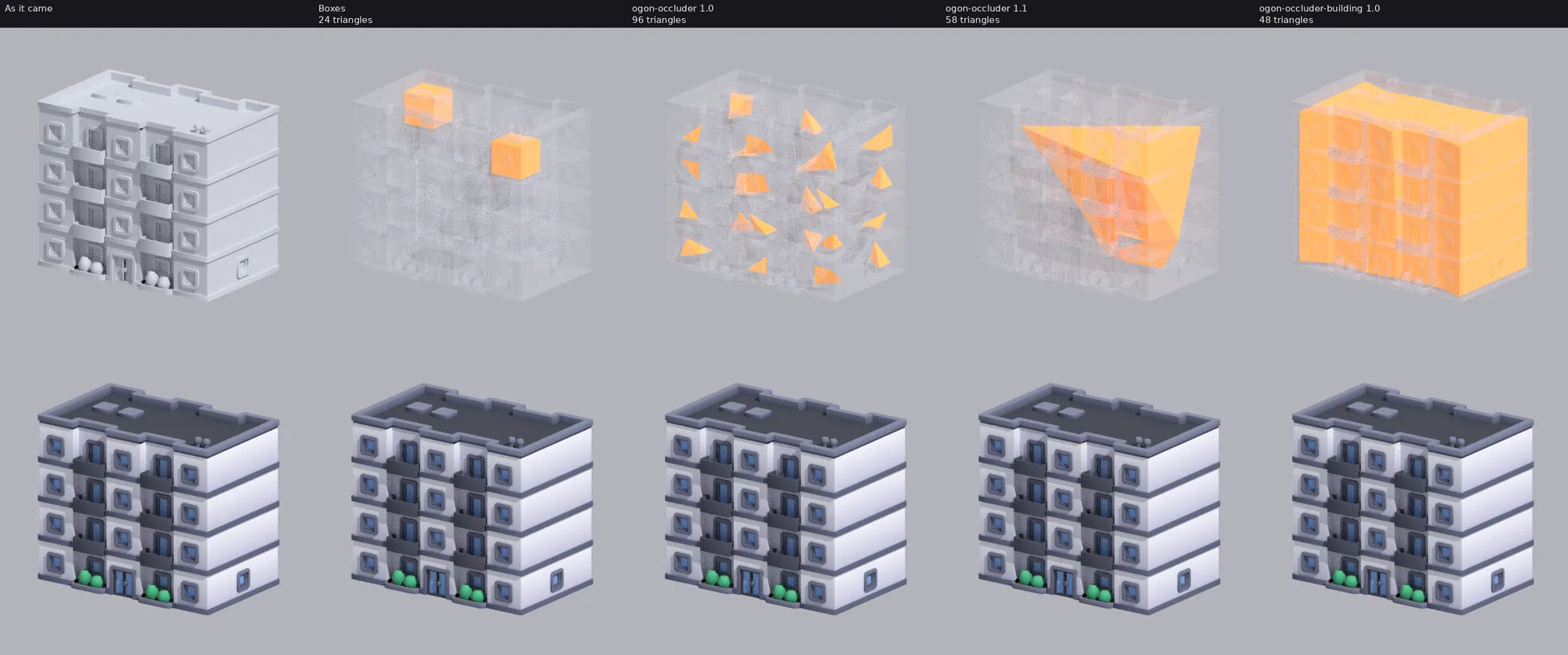
An occluder is a simple hidden shape that tells the engine "nothing behind this can be seen", so it can skip drawing it. It has to be cheap, and it has to stay inside the model. If it pokes out, objects behind it vanish when they shouldn't. Boxes are safe but crude. A box can't follow a sloped roof, so on the townhouse a single box covers only 77.8% of its outline.
ogon-occluder 1.0 works in three steps.
- It starts from the closed surface my remesher makes (see Remeshing below).
- It rebuilds that surface one grid cell inward, on the same grid. Thin trim disappears and walls stay flat.
- It simplifies with edge collapses. Every new triangle must stay at least a quarter of that margin inside the real surface, and this is checked with exact triangle-to-triangle distances. Every triangle is checked exactly, with no sampling.
| Model | Boxes | ogon-occluder 1.0 |
|---|---|---|
| Townhouse | 77.8% | 91.0%, with 48 triangles |
| Chest | 26.7% | 94.4% |
| Boulder, 48 triangles each | 67.0% | 86.6% |
The shadow proxy uses the same method, half a cell inward and with more triangles. It's a low-poly shape that casts the model's shadow for a fraction of the cost. It follows the outline more closely on all 10 test models. The proxy it replaced had up to 11.4% of its surface sticking outside the model.
Buildings need their own method. Kit buildings are made of open sheets rather than closed shapes. Building_Small_1 is 221 parts, and 216 of them are open. So I flood-fill the voxel grid from the outside edge, and whatever the flood can't reach counts as the building. The walls are thickened by a few cells first so that doorways don't let the flood in, then thinned back. After that come the same inset and exact simplification as before. To check the result, Ogon casts 60,000 lines through it. If even one line passes through the occluder without hitting a real wall on either side, it doesn't make an occluder at all. The report says "under 0.005% at 95% confidence" rather than claiming zero. Building_Small_1, at 18,344 triangles, gets a 12-triangle occluder that blocks 84.0% of sight lines, where every other method I tried produced nothing.
Where it falls short. It's 7 to 34 times slower than boxes. Round props come out rough: the hydrant only reaches 70%. The building method assumes nothing inside the building needs culling, and it often needs a second run with a larger opening setting. No engine has drawn one of these occluders yet.
Remeshing
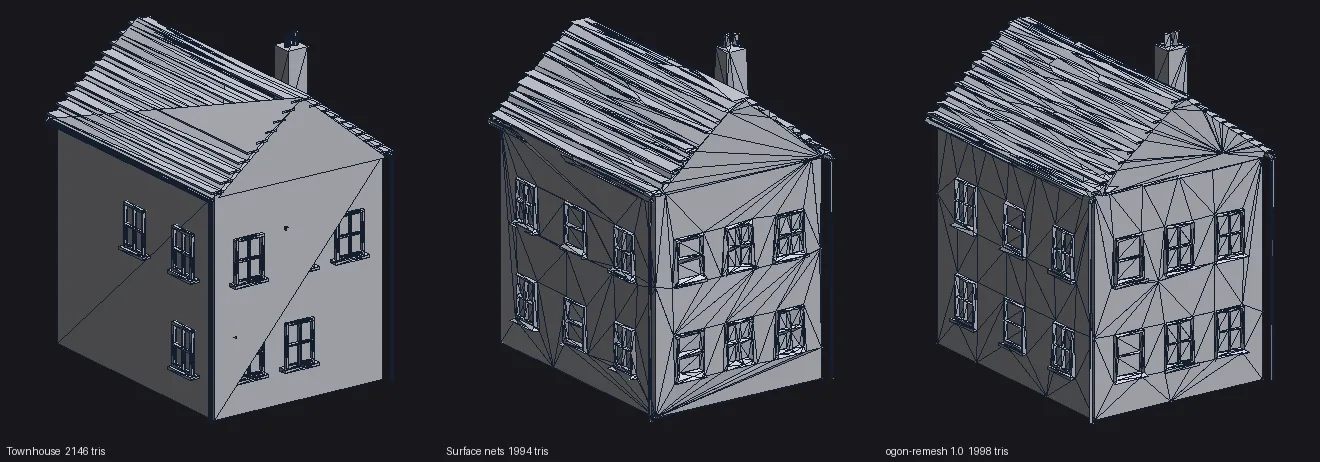
Voxel remeshing turns a model into a grid, builds a new surface from it, then reduces that. The catch is that the grid has no idea where the edges are, so hard edges get rounded off by up to a cell.
ogon-remesh 1.0 keeps the edges.
- It decides what's inside and outside using the winding number, so meshes with holes and loose kitbash pieces still work.
- It draws each original triangle onto the grid lines, so the position and direction of the surface come from the model itself rather than being guessed.
- It places one vertex per surface sheet per cell, at the point that best fits the planes around it. This is dual contouring. The pull towards the centre of the cell fades as the surface bends more sharply.
- It simplifies, then fits every vertex back onto the original's planes, twice.
| Model | Surface nets | ogon-remesh 1.0 |
|---|---|---|
| Hydrant at 996 triangles, average distance | 0.105% | 0.001% |
| 24-sided cylinder, not lined up with the grid | an 8-sided post, 2.2% off | 92 triangles, exact |
| Kitbashed console | 19,998 triangles | 374 triangles |
| Rock scan at 1,500 triangles | 0.684% | 0.417% |
For AI-generated models I added two extras. AI models often come with a flat backdrop plate stuck to them, so one option finds and cuts it off. It sorts the normals onto a 64 by 64 octahedral map and cuts along a plane when that plane holds 25% of the area. The other option closes small gaps before building the surface. On one model that took the lost area from 41% down to 7%.
Where it falls short. It's 1.6 to 3.7 times slower than surface nets. Thin straps get squashed at low triangle counts. On organic scans it's more accurate but doesn't look any better. I've only tested it on 13 small, clean models.
Repairing holes
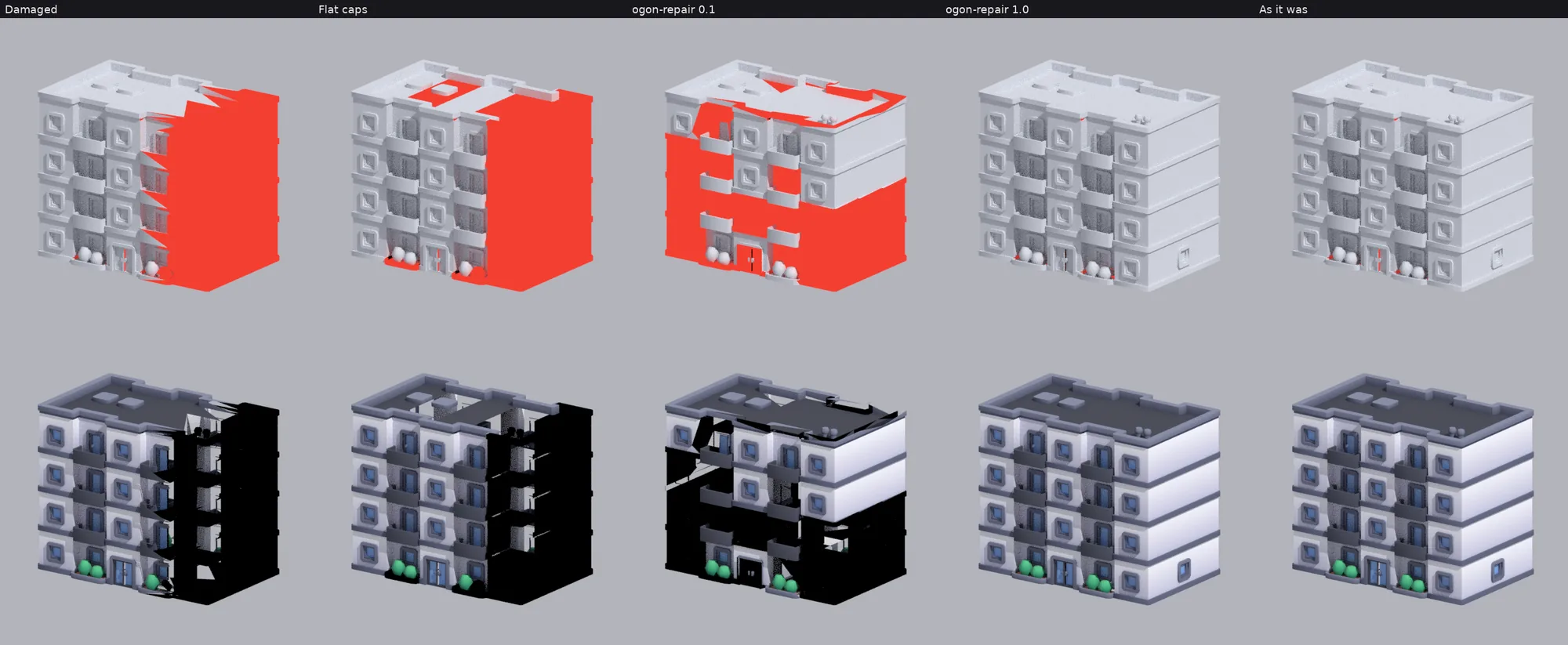
Most hole-filling tools triangulate the rim flat. Liepa's 2003 method smooths the patch instead, but that turns hard edges into chamfers. Most tools also "fill" the outline of a leaf card, which was never a hole.
ogon-repair 1.0 tries to rebuild what was there.
- It looks for points on the rim where the surface turns by more than 40 degrees. Each of those marks a hard edge running into the hole, and its direction is the cross product of the two normals.
- It joins those edges up across the hole. When three or more point at the same spot, they meet there, found by least squares.
- Those edges cut the hole into smooth pieces. Each piece gets Liepa's triangulation and then a thin-plate fit with cotangent weights. Pieces that should be flat come out exactly flat.
- To tell a real hole from the edge of an open sheet, it checks the faces around the loop. If they run along the loop's plane it's a hole. If they fold back it's the rim of a sheet, and it's left alone.
- It orients faces by looking at both sides of each one, with 16 rays per side per sample point.
| Test | Flat caps, Blender 5.2 or Liepa | ogon-repair 1.0 |
|---|---|---|
| Holes across a box's edge or corner | 0.5 to 0.9% off, faces 21 to 37 degrees wrong | exact, apart from rounding |
| A big hole in a ball | 1.26% flat, 1.34% in Blender | 0.085% |
| Faces wrongly flipped on 31 clean real models | 197 with flat caps | 0 |
Where it falls short. On round holes the improvement is really Liepa's. It's about 1.5 to 1.8 times slower. Holes that run into an open border aren't filled, and it doesn't repair self-intersections.
Removing hidden faces
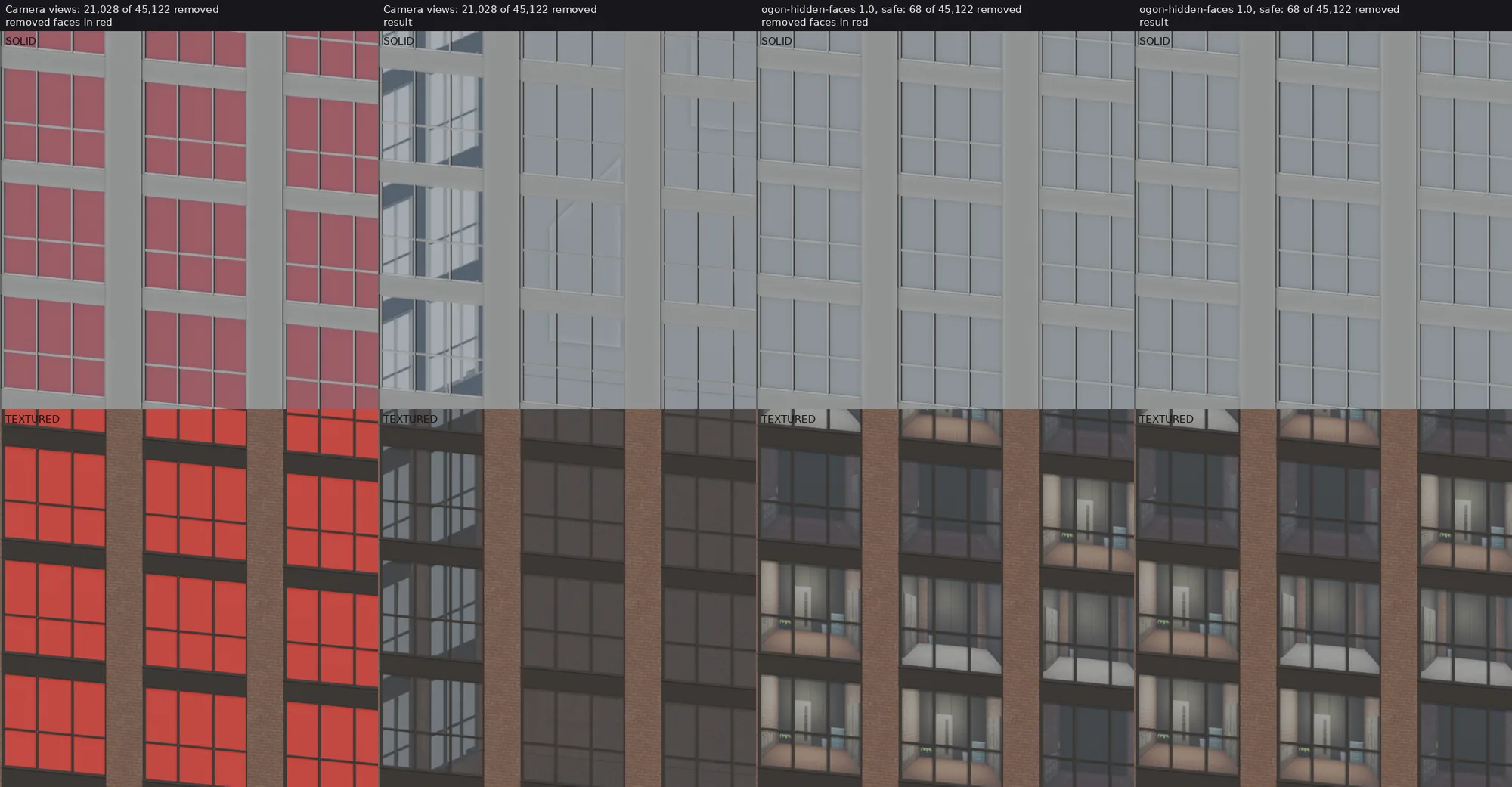
The usual approach renders the model from lots of camera positions and deletes every triangle that never shows up in a picture. My first version did 64 views at 1024 pixels. It treated glass like concrete and missed triangles smaller than a pixel. When I checked, my judge could see 28% of what it had deleted.
ogon-hidden-faces 1.0 asks a different question for each triangle: is there any line from it that gets out of the model?
- Points and directions come from one evenly spread 4D sequence. A small triangle gets up to 2,048 samples, and it stops at the first line that gets out.
- Glass never blocks. One-sided faces only block from the front.
- Extra samples along the edges, and lines that skim the surface, find thin strips that would otherwise be missed.
- In kit buildings, a face doesn't block near an edge that isn't shared with another face. That turns the cracks between kit pieces into openings the samples can find.
- For characters, a face has to stay hidden in up to 32 animation poses.
- Finally it casts up to 8 million random lines from outside and puts back anything they hit.
| 24 models, 128,091 triangles | Removed | Visible to the judge |
|---|---|---|
| Camera views (my old method) | 37,363 | 10,352 |
| Safe mode | 1,889 | 0 |
| Balanced mode | 19,635 | 66 |
Where it falls short. Safe mode only removes 6.9% of what's really hidden, and the whole thing runs on the CPU.
UVs and lightmaps
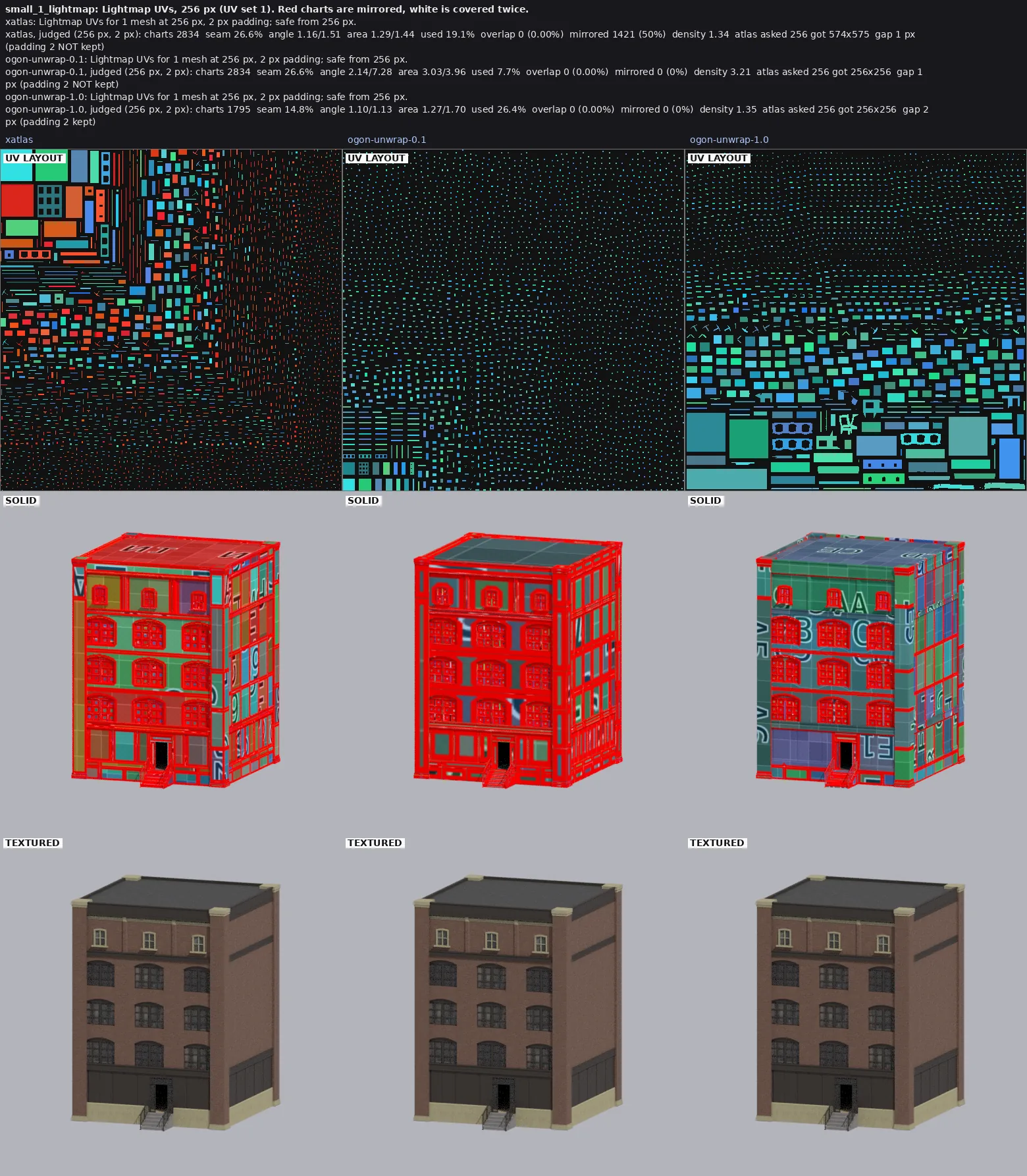
xatlas is what most people use. In my tests it treated the requested resolution as a suggestion: none of 29 layouts came out at the size I asked for. Its "rotation" swaps x and y, which mirrored half of the charts.
ogon-unwrap 1.0 is written from scratch.
- Every face starts as its own chart. Neighbouring charts merge, cheapest first, as long as all their normals stay close to one circle on the sphere. That means the chart is close to a plane, a cylinder or a cone. Checking it is one 3 by 3 eigenvalue, updated in constant time.
- Edges sharper than 50 degrees always stay as seams.
- Each chart is flattened with a least-squares conformal map, then improved with symmetric Dirichlet steps that stop before any triangle would flip. Across 29 models, no triangle flipped.
- I wrote my own packer. It tracks free space as runs of texels per row, places each chart as low and then as far left as it can go, tries four quarter turns and never mirrors. It searches for the single density that fills the square.
| Measure | xatlas | ogon-unwrap 1.0 | By hand |
|---|---|---|---|
| Layouts at the size asked for (29 models) | 0 | 29 | |
| Total charts, 29 models | 8,142 | 5,043 | |
| Charts on the lion head | 508 | 108 | 44 |
| Lion head, share of the square used | 49.8% | 68.3% | 73.7% |
| Lion head, time | 14.4 s | 2.6 s |
Where it falls short. It matches or beats xatlas on every measure for 17 of the 29 models, not all of them. Its seams are more ragged (an average turn of 34.5 degrees against 23.1). Lightmaps for boxy models pack less tightly, at 69% against 81%.
Trimming alpha cards
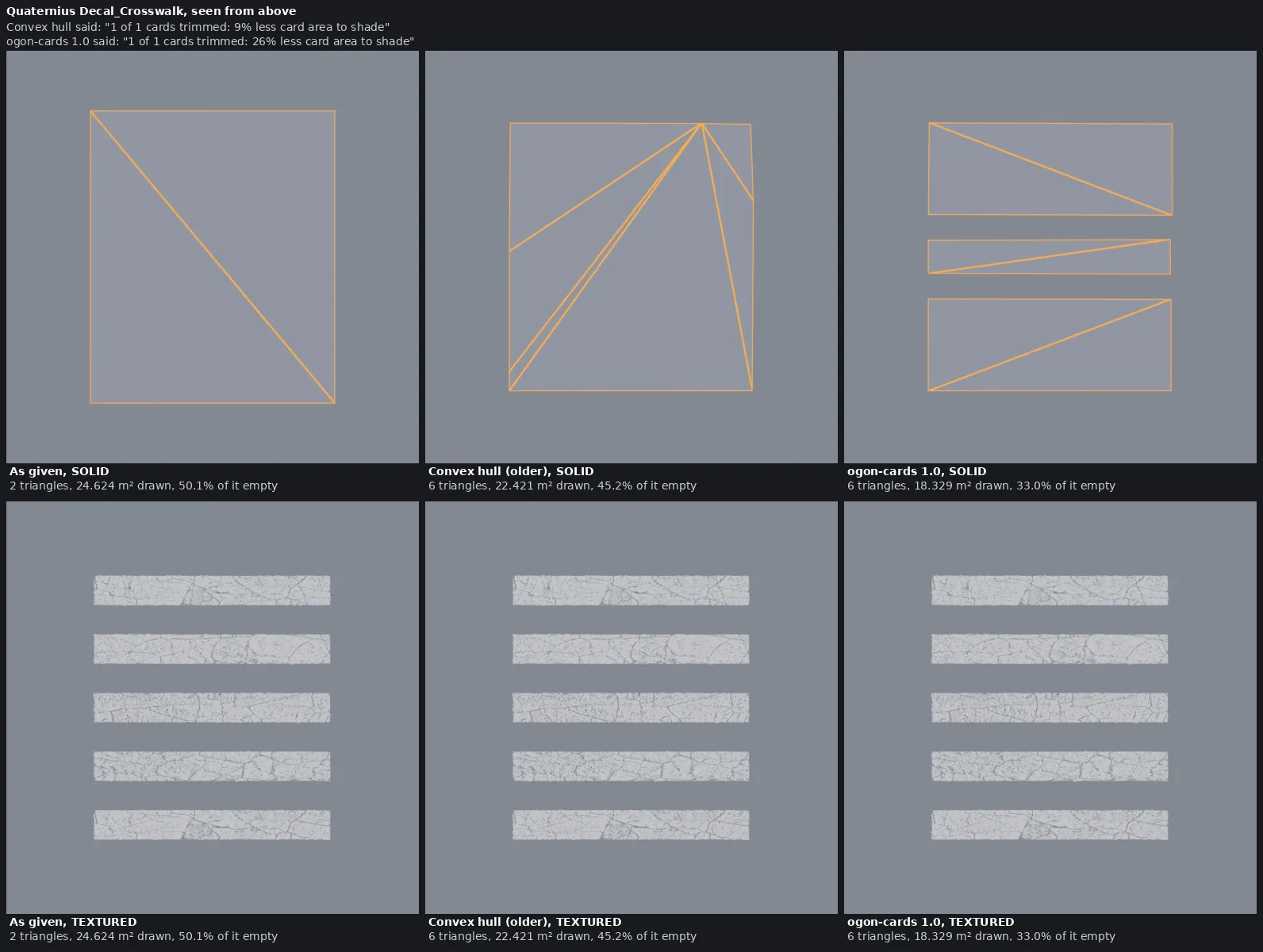
Leaves and grass are usually drawn on flat cards with a transparent texture, and transparent pixels cost as much to draw as solid ones. On my fern test, 81 of every 100 pixels on the cards show nothing. The standard fix wraps the solid pixels in an 8-sided convex hull. That still keeps the gaps, only works on loose quads, and can't do anything at all with 4 vertices.
ogon-cards 1.0 works like this.
- Any flat piece counts as a card, whether it's a quad, a triangle, a strip or a fan.
- For each card it finds the outline that covers the visible pixels with the least area, using 1, 2, 3 or more triangles. It starts from the smallest convex polygon a search can find, and gives separate islands their own outlines.
- There's one triangle budget for the whole model, and it's spent where it removes the most drawn area.
- Attributes such as skin weights and wind colours are read back from the original surface.
- Every visible texel is tested again at the end. If a card has lost one, the original card goes back.
| Model | Old trimmer, share left empty | ogon-cards 1.0 |
|---|---|---|
| Street crossing, 8 vertices | 44.5% | 32.4% |
| Fern, 4 vertices | 81.2% | 66.4% |
| Six ivy props, 8 vertices | 51.9% | 48.3% |
No visible pixels were lost on any of the 39 test models.
Where it falls short. I was aiming for 30% empty on the ivy and got 48%. The test set also has no real trees, grass or hair yet.
Guessing which way is up
Models often arrive lying on their side because of an export setting. My old guess assumed the biggest flat end was the base, but a wall is also a big flat end. On models it hadn't seen before, it was right 26% of the time and wrong 21% of the time.
ogon-upright 1.0 isn't a neural network. It scores the six axis directions using a few cheap clues. The strongest is the pivot point: a wrong export axis rotates the model around its origin, so the origin usually stays on the real floor. The others are which way "up" points in the texture once it's mapped onto the model, whether there's a flat base, whether the sides mirror each other, and the bone names on rigged models. It only turns a model when one direction is clearly ahead and two different kinds of clue agree. Otherwise it leaves the model alone and says why.
| 1,368 cases it hadn't seen | Right | Left alone | Wrong |
|---|---|---|---|
| Old method | 26% | 53% | 21% |
| ogon-upright 1.0 | 42% | 58% | 0.3% |
Where it falls short. 42% is well short of the 80% I was aiming for, and without a useful pivot it's rarely confident. Ogon does have a small neural network runtime built in, with dense, convolution and pooling layers, each with a GPU kernel and a CPU reference. But I haven't trained the networks for this or for texture roles yet.
Asset Doctor
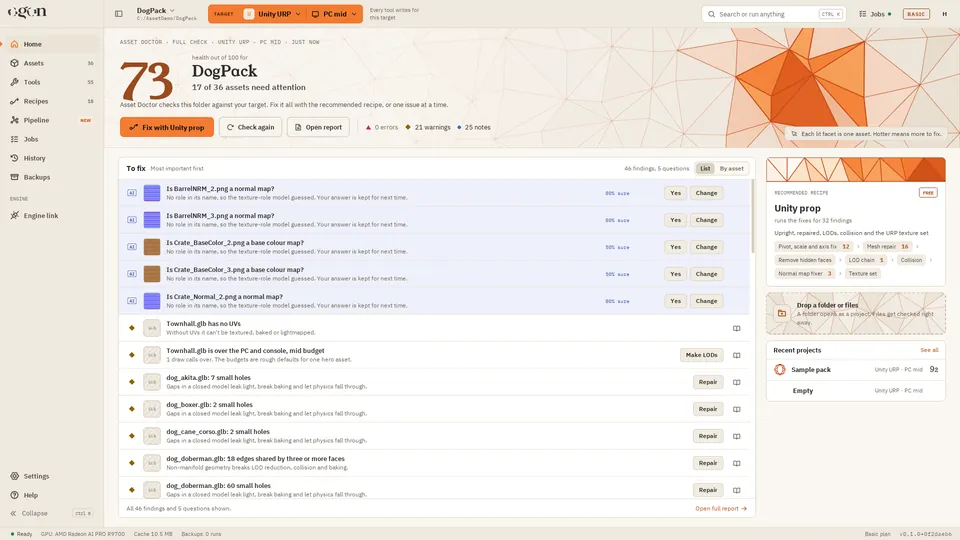
Asset Doctor runs as soon as you open a folder. For models it checks scale, the up axis, the pivot, mirrored nodes, broken edges, holes, flipped faces, missing UVs, overlapping lightmap UVs and triangle budgets. For textures it checks for flat maps, unused channels, the normal-map convention, sizes and PBR value ranges. Everything is judged against the engine and platform you've picked.
- Every asset starts at 100. It loses 25 points for each error, 8 for each warning and 1 for each note.
- The folder's score is half the average and half the share of assets with no problems. That way a few broken files still pull the score down.
- A project can set its own budgets for each kind of asset, such as props or animals.
- Each problem has a one-click fix that runs the right tool on just that file, and the report suggests the best starting recipe.
Where it falls short. The budgets are rough defaults, and you have to tell it which kind of asset each file is.
Textures
Packing texture sets. Each engine wants a material's maps packed differently: Unity's metallic-smoothness map, HDRP's mask map, Unreal's ORM. Ogon works out what each texture is from its file name and checks that against what's in the pixels, with a confidence score for each guess. Below 0.6 it asks you, and remembers your answer. The resizing and packing run in compute shaders. A batch of 40 sets went from 15.0 seconds and 4.0 GB of memory to 5.1 seconds and 1.9 GB. I also found that for lots of small sets the CPU path is faster, because it can use every core.
Block compression with my own encoders. For BC1, the colours in each block are projected onto their main axis (found by power iteration), and endpoints inset by 0, 1/16 and 1/8 are all tried. BC4 uses the block's minimum and maximum as endpoints, and BC3 and BC5 are built on top of it. Every map gets a PSNR score, an angle error for normal maps, and a heatmap of where the error is. To check my numbers, I decoded the same files with Pillow:
| Map | My figure | Pillow's decode |
|---|---|---|
| Base colour, BC1 | 44.1 dB | 44.1 dB |
| Normal map, BC5 | 57.7 dB | 55.9 dB |
Telling DirectX normal maps from OpenGL ones. In a real normal map, the slopes fit together, so if you read them the right way their curl is close to zero. Flip the green channel and they stop fitting. The fixer reads the map both ways and picks the one with the lower curl. If its confidence is below 0.15 it asks you.
Where it falls short. There's no BC7, ETC2 or ASTC yet. The curl test was calibrated on maps I generated, not on real pairs of OpenGL and DirectX maps.
Baking, impostors and sprites
- The baker makes normal maps (MikkTSpace), ambient occlusion, curvature and thickness. Each texel's rays come from a stateless PCG hash, so the GPU fires exactly the same rays as the CPU version. The tests require the two to agree within a ray or two per texel. There's no cage support yet.
- Impostors are a 12 by 12 grid of views in an octahedral or hemi-octahedral layout, with albedo, normal, 16-bit depth and ORM atlases. I haven't written the engine shaders to display them yet.
- 3D to sprites renders a model on the GPU from 4 or 8 directions, side-on, 2:1 isometric or top-down, with matching normal sprites, a shared pivot and 2x supersampling.
- Flipbook motion vectors are fitted to the same blend the shader will draw, and scored on the in-between frames that get thrown away. On 6 test clips they came out 15.1 dB better than a plain crossfade, where my older method managed 1.4 dB. All of those clips were generated, though, not real effects.
What's next
- Checking inside real engines. Almost nothing has been imported into Unity, Unreal or Godot and checked there yet. That's the biggest gap.
- Separate test sets. Several methods were tuned on the same models they were judged on. They need fresh models to prove themselves on.
- More real data. A lot of these results rest on 10 to 30 models from a handful of artists.
- Speed. My LOD methods are 5 to 15 times slower than meshoptimizer.
- Better defaults. A new method only becomes the default when it's at least as good on every model. LOD 1.1, unwrap 1.0 and the new occluders aren't there yet.
- More formats. BC7, ASTC and KTX2, and training the networks I've planned.